
Security Architecture Views: Showing Your Design
Security by Design · 4 min read
FDA expects four security architecture views in a premarket submission: a global system view, a multi-patient harm view, an updatability and patchability view, and security use case views. Together they show reviewers where your device connects, where trust boundaries sit, and how security holds up in real clinical scenarios.
3.5.1 Why Architecture Views Matter
Architecture views are like blueprints that show how security is built into your device. They help:
- FDA reviewers understand your security design
- Development teams implement consistently
- Security assessments identify gaps
- Future maintainers understand the system
The FDA specifically requires four types of architecture views, each serving a different purpose. For why these architectural decisions pay off across the device lifecycle, see Security architecture as the foundation of your medical device.
3.5.2 Global System View
Purpose
According to FDA guidance: "A global system view should describe the overall medical device system, including the device itself and all internal and external connections."
System Components:
- The medical device itself
- Connected medical devices
- IT infrastructure (servers, databases)
- Network components
- External services (cloud, update servers)
- User interfaces (apps, workstations)
Communication Paths:
- Wired connections (USB, Ethernet)
- Wireless connections (Wi-Fi, Bluetooth)
- Remote connections (VPN, internet)
- Service connections (JTAG, serial)
Trust Boundaries:
- Between device and external world
- Between different privilege levels
- Between different networks
- Between different user types
Example Global System View Elements

Key Considerations
Completeness: Include ALL connections, even those used rarely (like service ports)
Clarity: Use standard notation and clear labels
Updates: Keep current as system evolves
3.5.3 Multi-Patient Harm View
Purpose
Per FDA guidance, this view "addresses how the device and system defend against and/or respond to attacks with the potential to harm multiple patients."
Understanding Multi-Patient Harm
Multi-patient harm can occur when:
- Multiple devices are compromised simultaneously
- A central system affecting multiple devices fails
- Malware spreads between devices
- Common vulnerabilities affect device fleets
What to Include
Attack Scenarios:
- Ransomware affecting all devices on network
- Compromised update pushing malware
- Central monitoring system failure
- Coordinated device manipulation
Defensive Measures:
- Network segmentation
- Device isolation capabilities
- Anomaly detection
- Incident response procedures
Impact Analysis:
- How many devices could be affected?
- What's the patient impact?
- How quickly could it spread?
- What's the recovery time?
Example Scenarios to Address
-
Network-Based Attack
- Attacker gains network access
- Scans for vulnerable devices
- Exploits common vulnerability
- Compromises multiple devices
-
Supply Chain Attack
- Malicious update created
- Distributed to all devices
- Activates simultaneously
- Affects entire fleet
-
Central System Compromise
- EMR system breached
- Sends malicious commands
- Multiple devices respond
- Patient care disrupted
Example Multi-Patient Harm View

3.5.4 Updateability and Patchability View
Purpose
This view "describes the end-to-end process that permits software updates and patches to be deployed to the device."
Critical Update Path Elements
Update Creation:
- Development environment security
- Code signing process
- Update packaging
- Version control
Update Distribution:
- Update server security
- Distribution channels
- Network paths
- Authentication methods
Update Installation:
- Device authentication of updates
- Integrity verification
- Installation process
- Rollback capability
Update Verification:
- Success confirmation
- Functionality testing
- Error handling
- Status reporting
Security Controls Throughout
Each step needs specific security controls:
- Authentication: Verify update source
- Integrity: Ensure update unchanged
- Confidentiality: Protect update contents
- Availability: Maintain device function
- Authorization: Control who can update
Common Pitfalls to Avoid
- Unsigned updates
- Unencrypted distribution
- No rollback mechanism
- Weak authentication
- Missing integrity checks
Example Updateability and Patchability View

3.5.5 Security Use Case Views
Purpose
These views "cover all medical device system functionality through which a security compromise could impact the safety or effectiveness of the device."
Identifying Critical Use Cases
Ask yourself:
- What functions could harm patients if compromised?
- Which features have the highest privilege?
- What operations handle sensitive data?
- Which interfaces are most exposed?
Common Security-Critical Use Cases
-
Clinical Parameter Changes
- Therapy settings
- Alarm limits
- Dosage calculations
- Treatment protocols
-
Emergency Access
- Override procedures
- Rapid access needs
- Audit requirements
- Recovery methods
-
Remote Access
- Service connections
- Telemedicine interfaces
- Remote monitoring
- Cloud connectivity
-
Data Management
- Patient data access
- Export functions
- Backup procedures
- Data deletion
Documenting Each Use Case
For each security use case, document:
Scenario Description:
- What happens normally
- User types involved
- Data flows
- Success criteria
Security Requirements:
- Authentication needs
- Authorization levels
- Audit requirements
- Data protection
Threat Scenarios:
- How could this be attacked?
- What's the impact?
- How is it detected?
- How is it prevented?
Security Controls:
- Specific measures implemented
- Defense in depth approach
- Monitoring capabilities
- Response procedures
Example Use Case View
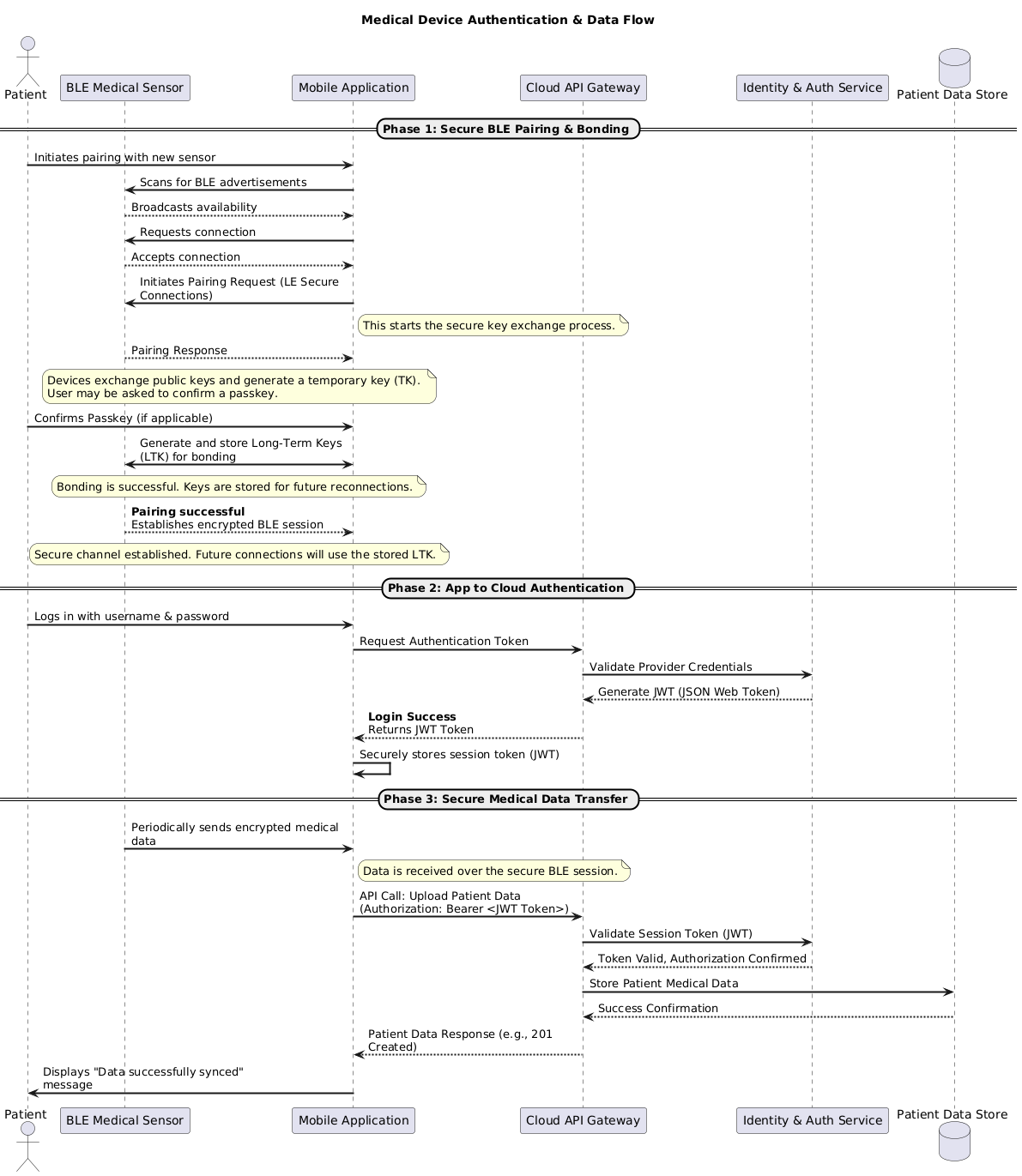
For a step-by-step walkthrough of building these views, see How to create an architecture security view for your medical device.
Sources
Primary documents for the topics in this section:
- FDA premarket cybersecurity guidance, Section V.B.2 Security Architecture Views and Appendix 2, FDA, February 3, 2026.
- FDA premarket cybersecurity guidance, Appendix 4 Premarket Submission Documentation Elements, FDA, February 3, 2026.
- Postmarket Management of Cybersecurity in Medical Devices, FDA, December 28, 2016.
Related articles
Blog posts that go deeper on topics in this section.
See how your device measures up
Take the free FDA 524B readiness assessment and get a personalized gap report covering this topic and more.
Check Your ReadinessNeed the documents written, not just checked? CyberMed writes the eSTAR cybersecurity section and runs the penetration testing behind it.