
Introduction and Scope
Purpose of This Guide
Most device startups lose time in the same place: the stretch between "we have a promising concept" and "we're running a controlled design project." This guide covers that stretch. It walks through intended use and indications for use, user profiles, user needs, design inputs, and a first hazard analysis, in the order you'll usually need them.
It's written for small teams with limited money and time who have to make early calls that shape everything after. For the full design and development or risk management process, see the standards listed below.
What This Guide Covers
- Pre-development research and feasibility, before design and development requirements apply
- Intended use and indications for use, and why the difference matters
- User research: who will use the device, and where
- User needs
- Design inputs built from those needs and from risk analysis
- Preliminary hazard analysis: finding hazards, hazardous situations, and possible harms while the design is still cheap to change
- Early formative evaluation
- A documentation setup with traceability that will hold up later
What This Guide Does Not Cover
- Design and development activities through design transfer
- A complete risk management system
- Verification and validation protocols
- Manufacturing process development
- Clinical study design
- Preparing the regulatory submission itself
- Post-market surveillance
Regulatory Foundation
FDA's Quality Management System Regulation (QMSR) took effect on February 2, 2026. It replaced most of the old Quality System Regulation and incorporates ISO 13485:2016 by reference (21 CFR 820.7). Older material, including earlier versions of this guide, talks about "design controls" under 21 CFR 820.30 and a "design history file." Those sections are gone. The requirements now sit in ISO 13485:2016 clause 7.3 (design and development), applied through 21 CFR 820.10(c). We use the QMSR terms below and mention the old names where it helps.
The guide draws on these documents:
- 21 CFR Part 820, Quality Management System Regulation (effective February 2, 2026)
- ISO 13485:2016, Medical devices: Quality management systems, Requirements for regulatory purposes
- ISO 14971:2019, Medical devices: Application of risk management to medical devices
- IEC 62366-1:2015+AMD1:2020, Medical devices, Part 1: Application of usability engineering to medical devices
- FDA, Applying Human Factors and Usability Engineering to Medical Devices (February 2016)
- FDA, General/Specific Intended Use (November 1998)
- ANSI/AAMI HE75:2025, Human factors engineering: Design of medical devices
- AAMI TIR59:2017, Integrating human factors into design controls
- FDA, Design Control Guidance for Medical Device Manufacturers (March 1997). Written for the old 820.30. Still useful background, but not a current requirement.
How to Use This Guide
The guide is split into phases that follow the usual order of early development. Each phase has goals, activities, things to produce, and a decision point at the end. Most also include a template or a worked example.
Start with Phase 0 if you're still testing feasibility. If you've already decided to build the product, start at Phase 1. Treat the templates as starting points and change them to fit your device and your team.
Early-Stage Development Process Flow
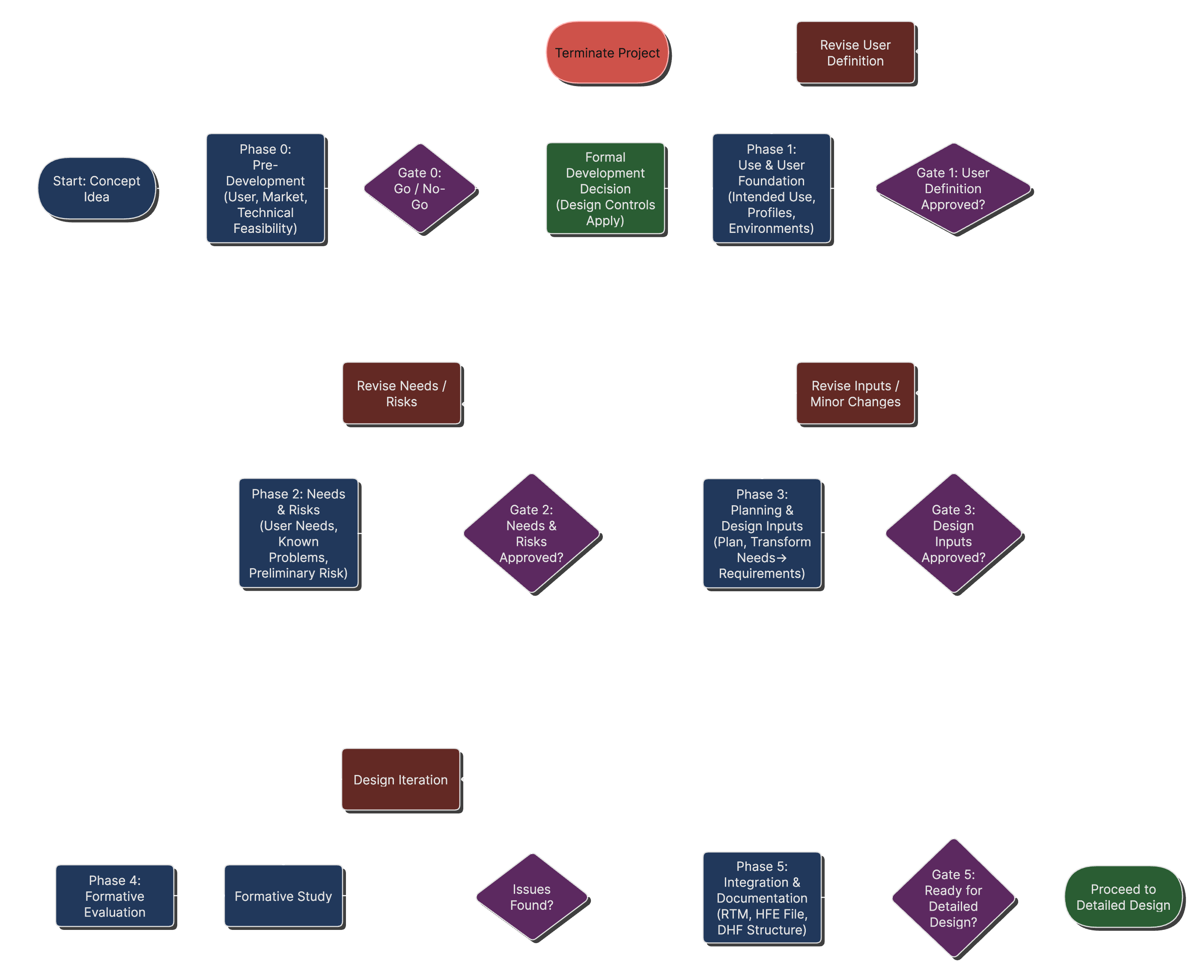
Early-stage process flow with the decision points between phases. "DHF Structure" in Phase 5 refers to what the QMSR now calls the design and development file.
What Makes Early Development Go Well
- Keep records from the start, even rough ones. You'll need them later.
- Base decisions on what real users need, not on what the team assumes.
- Think about the regulatory pathway early. Classification drives cost and schedule.
- Treat safety as part of every design decision.
- Link needs, requirements, and risk controls so you can trace each one.
- Expect several rounds of design, test, and change.
If you're also launching in the EU
The EU Medical Device Regulation (MDR, Regulation (EU) 2017/745) governs the EU market. You don't need a second development process. ISO 13485, ISO 14971, and IEC 62366-1 sit under both systems, so most of the early work in this guide serves both markets.
The differences are in classification, who reviews the device, and what you have to produce:
- EU classification rules (MDR Annex VIII), which often put a device in a different class than in the US
- A notified body assesses most devices, in place of FDA
- Clinical evaluation (Article 61 and Annex XIV) for every device, plus post-market clinical follow-up (PMCF) unless you justify why it isn't needed
- The General Safety and Performance Requirements (GSPR) in MDR Annex I. Your design has to meet them, and your technical documentation has to show it.
- Technical documentation laid out per Annexes II and III, and a post-market surveillance system from the start
Later sections end with a box like this one for that stage.
Understanding the Regulatory Landscape
When Do Design and Development Requirements Apply?
Startups often get this wrong in both directions. Some start formal design documentation too early and bury a research project in paperwork. Others wait too long and have to rebuild records after the fact.
Which Devices Are Covered
Under 21 CFR 820.10(c), the design and development requirements of ISO 13485:2016 clause 7.3 apply to all Class II and Class III devices. They also apply to a short list of Class I devices: devices automated with computer software, tracheobronchial suction catheters, non-powdered surgeon's gloves, protective restraints, manual radionuclide applicator systems, and radionuclide teletherapy sources.
Feasibility vs. Product Development
Early research and feasibility work sits outside these requirements. In the 1996 final rule that added design controls to the Quality System Regulation, FDA said they weren't meant to apply to developing concepts and feasibility studies. FDA's QMSR training material puts it in practical terms. FDA recommends starting design and development once research is ending and you have proof of concept. It also lists points by which your design and development process must be in place, for example before you start a clinical investigation under an investigational device exemption (IDE), or submit a 510(k), De Novo, PMA, or HDE.
So you can explore concepts, build rough prototypes, and talk to users without the full set of design and development records. Just don't treat "we haven't formally decided yet" as a reason to delay design and development. If a clinical study or a submission is coming, your design and development process has to exist before it.
The Transition Point
In practice, the switch happens when the company decides to develop a specific device for market. Write that decision down. It usually includes:
- Market commitment: the specific opportunity you're going after
- Resources: named people and a budget
- Timeline, with project milestones
- Regulatory strategy: a first view of classification and pathway
When Design and Development Requirements Apply
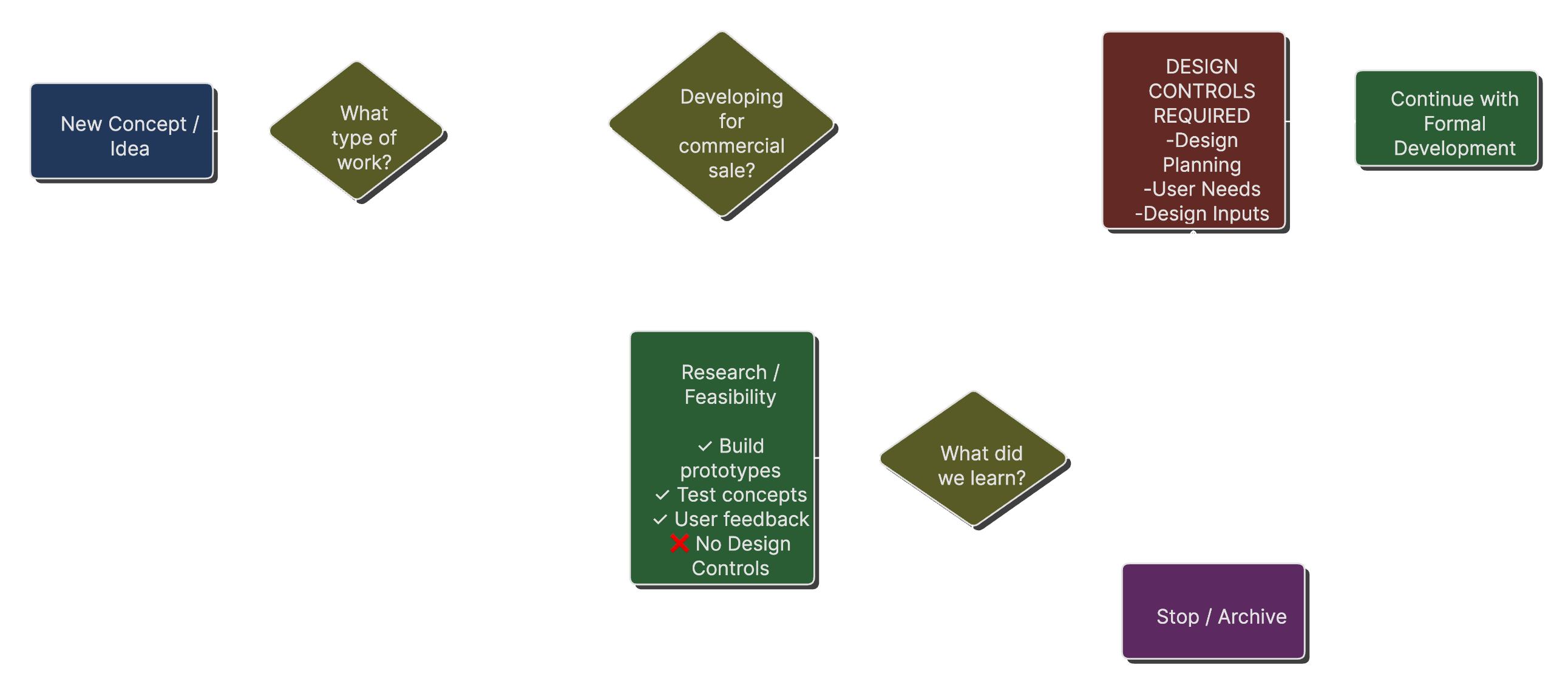
A decision tree showing when design and development requirements (called design controls under the old QSR) apply, and when they don't.
What This Means for Startups
Before the transition, you can:
- Do exploratory research without heavy documentation
- Build proof-of-concept prototypes for investor demos
- Run early user studies to check the market need
- Change concepts quickly
After the transition, going back to document design work you've already done is hard, and auditors notice. Have your procedures and document control ready before you cross the line.
Start With Users
FDA's human factors guidance (February 2016) recommends human factors work early. It describes preliminary analyses that identify users, user tasks, user interface parts, and use issues early in the design process (section 6). It also says analytical methods help most when you apply them early (section 6.3). The guidance isn't binding, but it's FDA's stated position, so plan to follow it.
IEC 62366-1:2015+AMD1:2020 makes it a requirement for anyone following the standard. The first step of its usability engineering process is the use specification (clause 5.1). The standard lists six elements for it:
- Intended medical indication
- Intended patient population
- Part of the body or type of tissue the device is applied to or interacts with
- Intended user profile
- Use environment
- Operating principle
The use specification then feeds the user interface specification and the rest of the usability work.
User Needs to Design Input Transformation
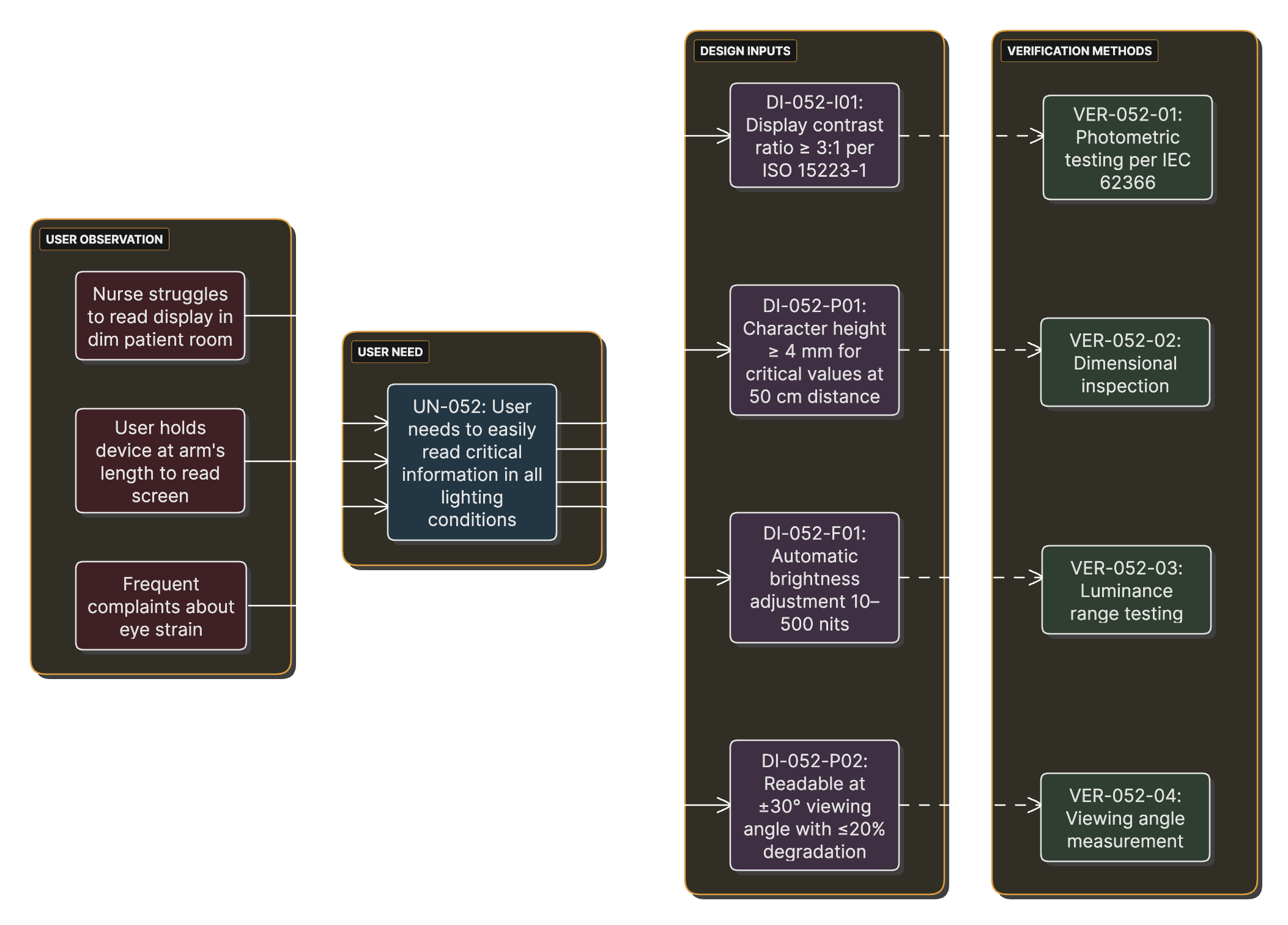
Over the course of a project, user observations become documented user needs, which lead to design inputs that must be verified.
Why Early User Focus Pays Off
Early user work finds use-related hazards while changes are still cheap. It also means the product fits what users actually do, you get fewer surprises in FDA review, and better usability can set you apart from competitors.
Risk Management from Day One
ISO 14971:2019 requires risk management throughout the device life cycle (clauses 1 and 4.1). It doesn't name a specific technique for early work. A preliminary hazard analysis (PHA) is a practical place to start. ISO/TR 24971:2020 describes it in Annex B.2, and it works with very little design detail.
A PHA helps you with:
- Hazard identification: listing potential sources of harm
- Design inputs: risk control measures become requirements
- Planning the testing you'll need later
- Regulatory strategy, including classification and pathway
Why a PHA Suits Startups
- It finds showstopper risks early
- Investors read it as a sign the team knows the regulatory side
- It informs technology and architecture choices
- Late design changes cost far more than early ones
If you're also launching in the EU
The MDR has no equivalent of the 820.10(c) device list. Every manufacturer needs a quality management system (Article 10(9)), and the system has to cover product realization, including planning, design, and development. In practice, most teams meet this with ISO 13485 design and development, for Class I devices too.
On feasibility, the MDR applies when you place a device on the market or put it into service. Devices used in a clinical investigation follow their own rules, covered in the Phase 4 box.
Risk is where the wording gets stricter. MDR Annex I requires you to reduce risks "as far as possible without adversely affecting the benefit-risk ratio" (sections 2 and 4), in a fixed order: safe design first, then protective measures, then information for safety. Section 5 adds a specific duty to reduce use-error risks, including those from the device's ergonomics and its use environment. Phase 2 covers what that means for your PHA.
Phase 0: Pre-Development Foundation
Overview and Objectives
Phase 0 is everything before the formal decision to develop a product for market. You're exploring, learning, and testing your basic assumptions about the market need and whether the technology can work.
Main objectives:
- Confirm there's a real need and real user interest
- Explore technical feasibility
- Understand the use environment and workflow
- Identify stakeholders and what each of them needs
- Learn enough to make an informed go/no-go call
Regulatory status: Feasibility and concept work in this phase generally falls outside the QMSR design and development requirements. Keep decent records anyway. You'll reuse much of this work once formal development starts.
User Research Activities
Contextual Inquiry
In contextual inquiry, you watch people do the real task in the real place. FDA's human factors guidance describes it in section 6.4.1 as an empirical way to find critical tasks: usually by observing intended users with a similar device already on the market, in the actual use environment. It shows you workarounds and interruptions that people rarely mention in an interview.
Example Observation Recording Sheet
## Contextual Inquiry Observation Sheet

**Date:** ___________  **Observer:** ___________
**Facility:** ___________  **User Role:** ___________

### Task Observed: [Specific task name]

**Start Time:** _____ **End Time:** _____

**Environment Characteristics:**
- Lighting: [ ] Bright [ ] Moderate [ ] Dim
- Noise Level: [ ] Quiet [ ] Moderate [ ] Loud
- Interruptions: [ ] None [ ] Few [ ] Many
- Space: [ ] Spacious [ ] Adequate [ ] Cramped

**Task Flow:**
1. Step performed: _____________________
   - Time taken: _____
   - Difficulties observed: _____
   - Workarounds used: _____

**Notable Observations:**
- Safety concerns: _____________________
- Efficiency issues: ___________________
- User frustrations: ___________________
User Interviews and Focus Groups
Observation shows what people do. Interviews tell you what they think, prefer, and expect. FDA's guidance covers one-on-one and group interviews (group interviews are sometimes called focus groups) in section 6.4.2, as another empirical way to identify critical tasks.
Technical Feasibility Assessment
User research tells you the need is real. A feasibility check tells you whether you can meet it within your cost, size, power, and schedule limits.
Technical Feasibility Assessment Matrix
## Technical Feasibility Assessment

### Core Technical Requirements

| Requirement | Feasible? | Risk Level | Notes |
|------------|-----------|------------|--------|
| Measurement accuracy ±2% | Yes | Low | Demonstrated with breadboard |
| 8-hour battery life | Maybe | Medium | Requires low-power design |
| <$50 manufacturing cost | No | High | Current estimate $85 |
| Waterproof to IPX7 | Yes | Medium | Requires sealing redesign |
| 5-year shelf life | Unknown | High | Requires stability testing |
Decision Point: Moving to Formal Development
Going from Phase 0 to Phase 1 is a business decision with regulatory consequences. Make it formally, write it down, and base it on criteria you agreed on ahead of time.
Go/No-Go Criteria
- Market validation: user need confirmed through research. Our rule of thumb is at least 10 users. Regulators don't set a number.
- Technical feasibility: core technology demonstrated
- Regulatory pathway: likely classification and pathway identified
- Resources: development funding secured or available
- Risk: no safety risk found that looks impossible to bring to an acceptable level
Gate Review Decision Matrix
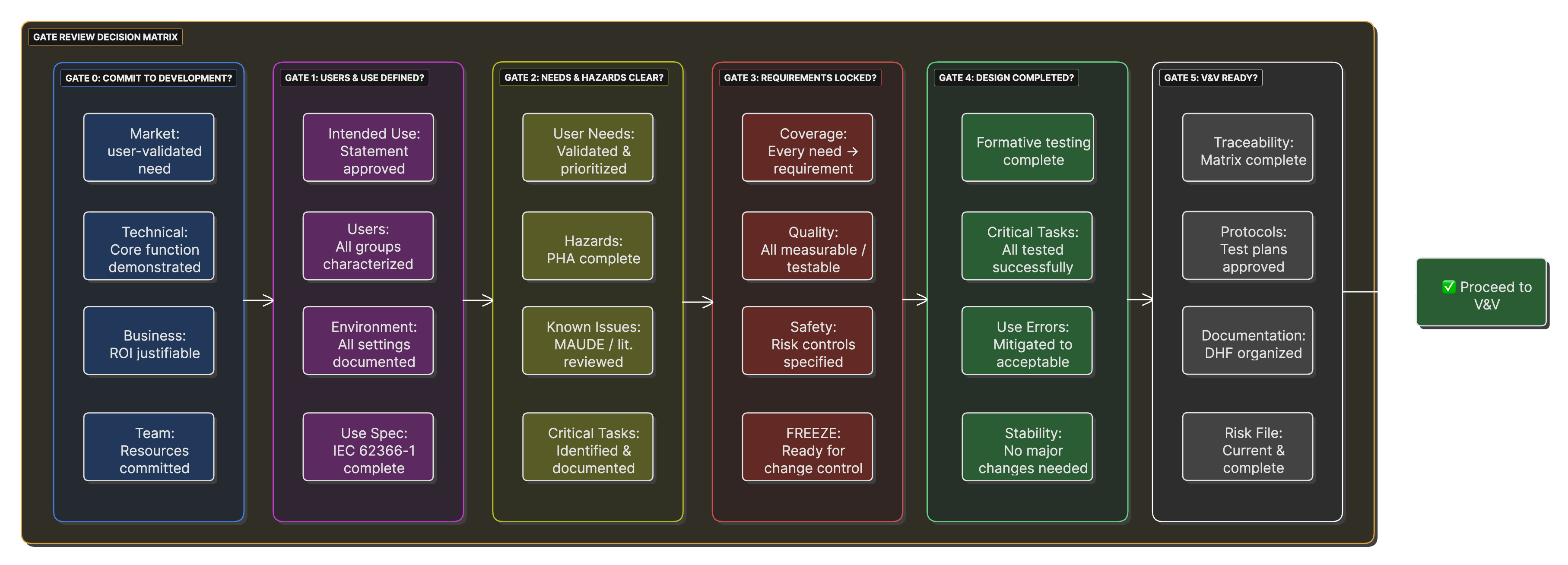
Criteria for each gate review, with go/no-go factors and the documentation each gate needs.
If you're also launching in the EU
- Classify under the MDR as well. Annex VIII has 22 rules, and the EU class won't always match the US one. Software is the usual surprise. Under Rule 11, software that provides information used for diagnostic or therapeutic decisions is at least Class IIa. It goes to Class IIb if those decisions could cause a serious deterioration of health or a surgical intervention, and to Class III if they could cause death or an irreversible deterioration of health.
- Check whether you need a notified body. Class IIa, IIb, and III devices do. Class I devices are self-declared, unless they're sterile, have a measuring function, or are reusable surgical instruments (Article 52(7)). Notified body capacity and lead time belong in your go/no-go decision.
- Plan for the people the MDR requires. You need a person responsible for regulatory compliance, or PRRC (Article 15). Micro and small companies (as defined in Recommendation 2003/361/EC) don't need that person on staff, but must have one permanently and continuously available. If you're not established in the EU, you also need an authorised representative (Article 11).
Phase 1: Defining Intended Use and Users
Overview and Transition
Formal product development starts here. You pin down who will use the device, where they'll use it, and what medical purpose it serves.
Transition Note
From here on, the design and development requirements apply (21 CFR 820.10(c), which applies ISO 13485:2016 clause 7.3). Phase 1 outputs become controlled records in your design and development file (ISO 13485:2016 clause 7.3.10), which the old QSR called the design history file (DHF). Review and approve them like any other controlled document.
Writing the Intended Use and Indications for Use
These two statements shape your classification, your pathway, and the scope of FDA's review. People mix them up all the time. In FDA usage, the intended use is the general purpose or function of the device. The indications for use describe the disease or condition the device will diagnose, treat, prevent, cure, or mitigate, and the patient population it's for (21 CFR 814.20(b)(3)(i)). In a legal sense, intended use is the objective intent of whoever is responsible for the labeling (21 CFR 801.4).
Levels of Specificity
FDA's General/Specific Intended Use guidance (1998) ranks proposed indications for use by how specific they are. The ranking goes roughly from a general tool or function, to a specific tissue or organ, to a specific disease or population, to a specific clinical outcome. It has separate lists for diagnostic and therapeutic devices. In a 510(k), a more specific indication can amount to a new intended use. That's why the wording needs care from the start.
Template for Intended Use and Indications for Use
## Intended Use and Indications for Use

### Device Name: [Your Device Name]

### Intended Use (general purpose or function):
The [Device Name] is intended to [general function, for example
"measure non-invasive blood pressure"].

### Indications for Use:
The [Device Name] is indicated for [specific disease, condition,
or clinical use] in [specific patient population with relevant
characteristics]. It is intended for use by [user types]
in [specific settings].

### Limitations and Contraindications:
- Not intended for [specific exclusion]
- Not for use in [excluded population]
- Should not be used for [excluded purpose]

### Prescription/OTC Status:
[ ] Prescription Use (Rx)
[ ] Over-the-Counter (OTC)
User Characterization and Personas
You need to know your users in detail, both to design well and to meet IEC 62366-1. The standard asks you to document the intended user profile as part of the use specification (clause 5.1), including the user characteristics that bear on design decisions.
Stakeholder Map for Medical Device Development
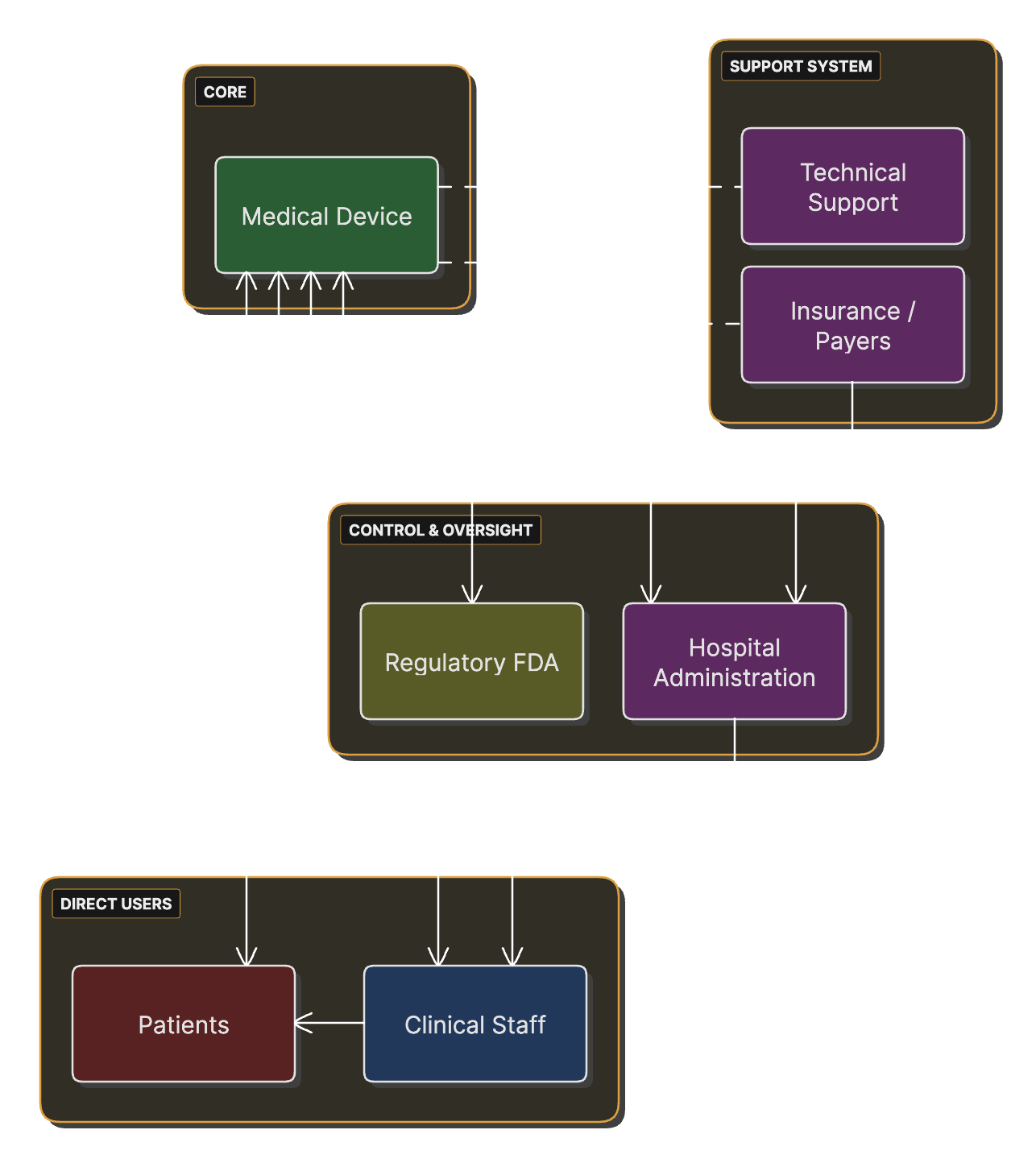
Stakeholders (users, patients, caregivers, facilities, regulators) and how each relates to the device.
Example Persona: "Nurse Nancy"
Background: Nancy is a 42-year-old registered nurse with 18 years in medical-surgical units. She works 12-hour shifts and usually has 5 or 6 patients.
Goals:
- Spend less time on routine tasks
- Less charting
- Prevent medication errors
- Have time for actual patient care
What this means for the design:
- Fewer interaction steps
- Large, clear touch targets
- Works with gloves on
- Audible feedback that carries in a noisy unit
Use Environment Specification
Where the device is used affects both its design and its safety. FDA's human factors guidance (section 5.2) recommends that you evaluate and understand the relevant characteristics of every intended use environment: lighting, noise, distractions, motion, and so on.
Use Environment Factors
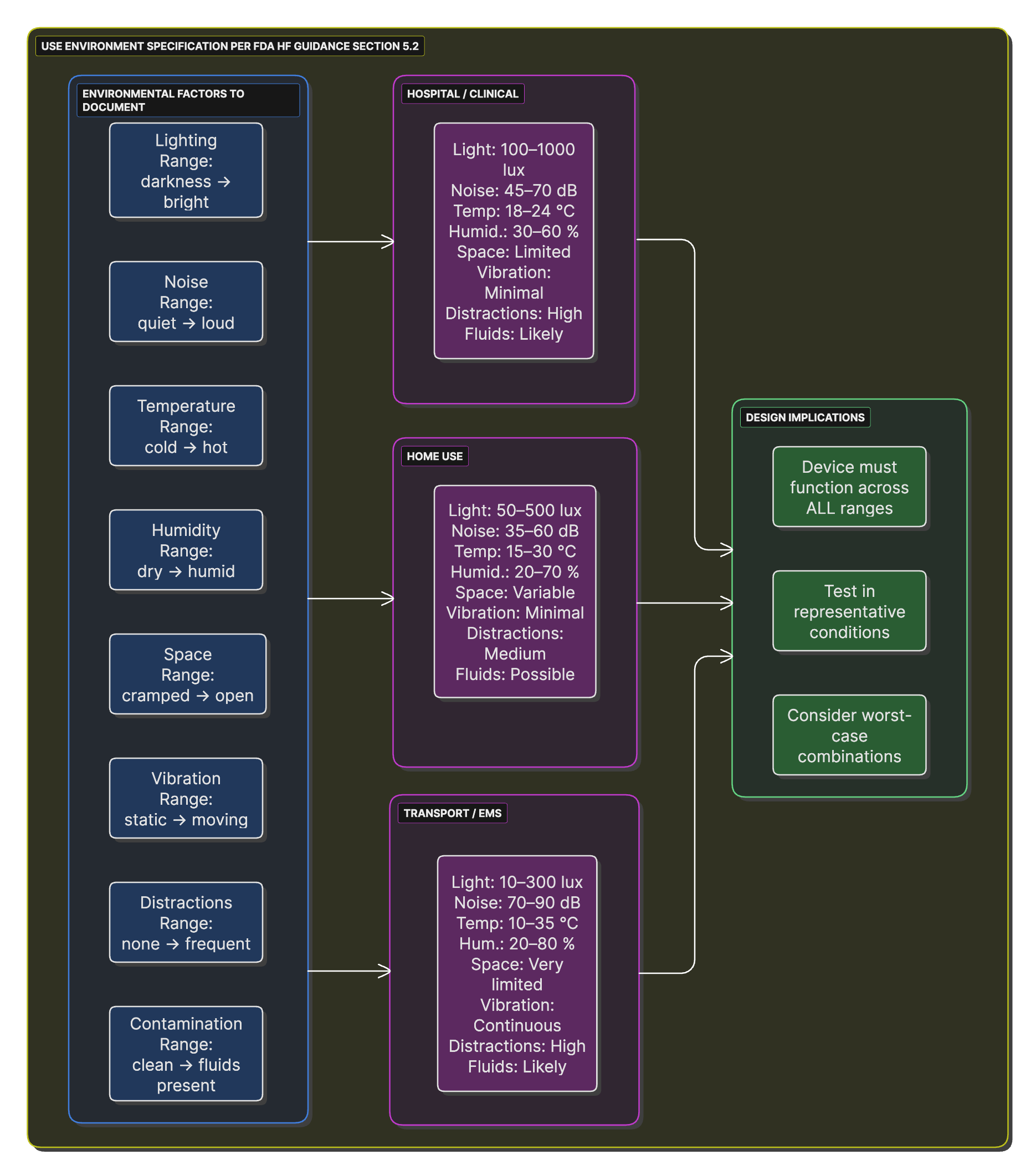
Environmental factors to consider (lighting, noise, temperature, and more), with scales for different use environments.
Creating the Use Specification
The use specification (IEC 62366-1 clause 5.1) pulls your user and environment information into one document with the six elements listed earlier. It drives the rest of your usability engineering work.
If you're also launching in the EU
Where FDA uses intended use and indications for use, the MDR uses one term: intended purpose (Article 2(12)). That's the use the device is intended for according to your label, instructions for use, promotional or sales materials, and clinical evaluation. Marketing claims count, so keep sales copy in line with the regulatory statement.
Write one core statement and adapt it to each market's format. Notified bodies and FDA reviewers both look for drift between documents. The use specification carries over unchanged, since IEC 62366-1 applies in both markets.
Phase 2: User Needs and Initial Risk Identification
Your research findings become written user needs, and you start identifying hazards.
User Needs Elicitation and Documentation
User needs are high-level statements of what users need to accomplish, with no design solution named. They come before design inputs. ISO 13485:2016 clause 7.3.3 requires inputs that can be verified or validated, so in Phase 3 you turn each need into measurable requirements. FDA's 1997 design control guidance drew the same line between user needs and design inputs.
User Need Documentation Structure
## User Need Documentation

### Need Identifier: UN-XXX

**Need Statement:**
The [specific user type] needs to [accomplish something specific]
[under what conditions] [to achieve what outcome].

**User Type:** [Primary User/Secondary User/Patient/Caregiver]

**Source:**
- [ ] Contextual inquiry observation
- [ ] User interview
- [ ] Focus group
- [ ] Complaint/incident analysis

**Priority:**
- [ ] Critical: essential for safe and effective use
- [ ] High: significant impact on user satisfaction
- [ ] Medium: improves user experience
- [ ] Low: nice to have

**Acceptance Criteria:**
[How will we know this need is met?]
Preliminary Hazard Analysis (PHA)
A PHA finds hazards before detailed design starts, so you can design risk controls in from the beginning. ISO 14971:2019 clause 5 sets the requirements for risk analysis, including identifying hazards and hazardous situations (clause 5.4).
Risk Management Integration Timeline
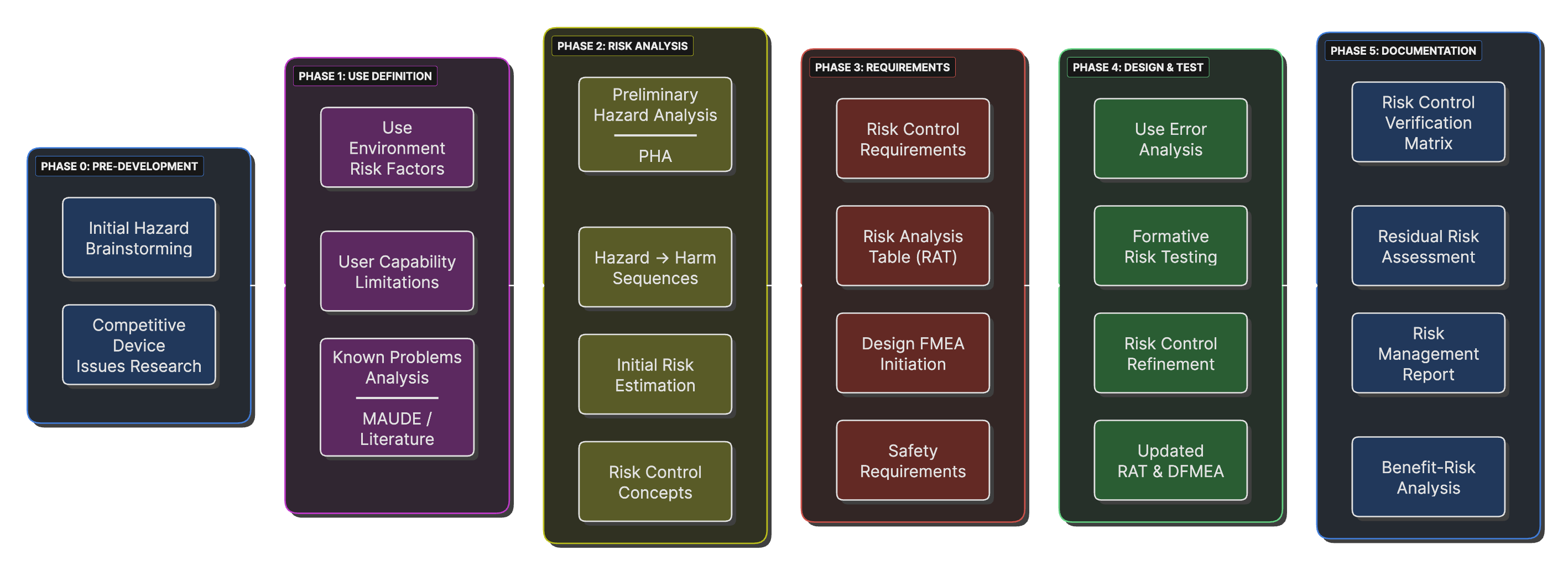
When each risk management activity happens relative to design and development milestones, with hazard identification starting early.
The checklist below follows the hazard categories in ISO 14971:2019 Annex C. Note that use error, missing information, and software problems aren't hazards on their own. Annex C treats them as events and circumstances that can lead to a hazardous situation, so they get their own list.
Hazard Identification Checklist
## Hazard Identification Checklist
(Categories follow ISO 14971:2019 Annex C, Tables C.1 and C.2)

### Energy Hazards
- [ ] Electric energy (voltage, leakage current, static discharge)
- [ ] Thermal energy (hot or cold surfaces)
- [ ] Mechanical energy (moving parts, sharp edges, stored energy)
- [ ] Radiation (ionizing, non-ionizing)
- [ ] Acoustic energy (sound pressure, ultrasonic)

### Biological and Chemical Hazards
- [ ] Biological agents (bacteria, viruses, fungi)
- [ ] Chemical agents (toxic materials, battery chemicals)
- [ ] Immunological agents (allergens such as latex; irritants such as
      cleaning residues)

### Performance-Related Hazards
- [ ] Data (availability, integrity, confidentiality)
- [ ] Delivery (wrong quantity or rate)
- [ ] Diagnostic information (wrong result, wrong patient)
- [ ] Functionality (alarm, measurement, critical performance)

### Events and Circumstances That Can Lead to Hazardous Situations
- [ ] Use error
- [ ] Reasonably foreseeable misuse (clause 5.2)
- [ ] Confusing or missing instructions for use
- [ ] Modes or controls that differ from existing equipment
- [ ] Exploitable software vulnerabilities
- [ ] Software defects (not in Table C.2; add them anyway)
Known Problems Analysis
Look at similar devices already on the market and the problems already reported for them. Make sure your design deals with those. FDA's human factors guidance covers this in section 6.2, on identifying known use-related problems.
Bringing Needs and Risks Together
Review user needs and risks side by side. A design that meets every need but ignores a hazard isn't finished, and the reverse isn't either.
If you're also launching in the EU
Under the MDR, deciding when a risk is low enough takes more. With ISO 14971 alone, a risk your plan defines as acceptable doesn't need a control. For the EU, you also have to show you reduced it as far as possible, measured against the Annex I bar described in the Regulatory Landscape box, and you must tell users about residual risks.
For EU work, use the European edition of the standard, EN ISO 14971:2019+A11:2021. Its Annex Z tables map each clause to the MDR requirements, and they explain where the MDR asks for more.
Phase 3: Design Planning and Input Development
Now the user needs and the PHA become formal design inputs, and you write the plan for the rest of the project.
Design and Development Planning
ISO 13485:2016 clause 7.3.2 requires you to plan and document design and development. In practice, get the plan in place before detailed design starts. FDA's 1997 design control guidance (section B) covers planning too, and it's still good background reading.
Document Hierarchy and Traceability
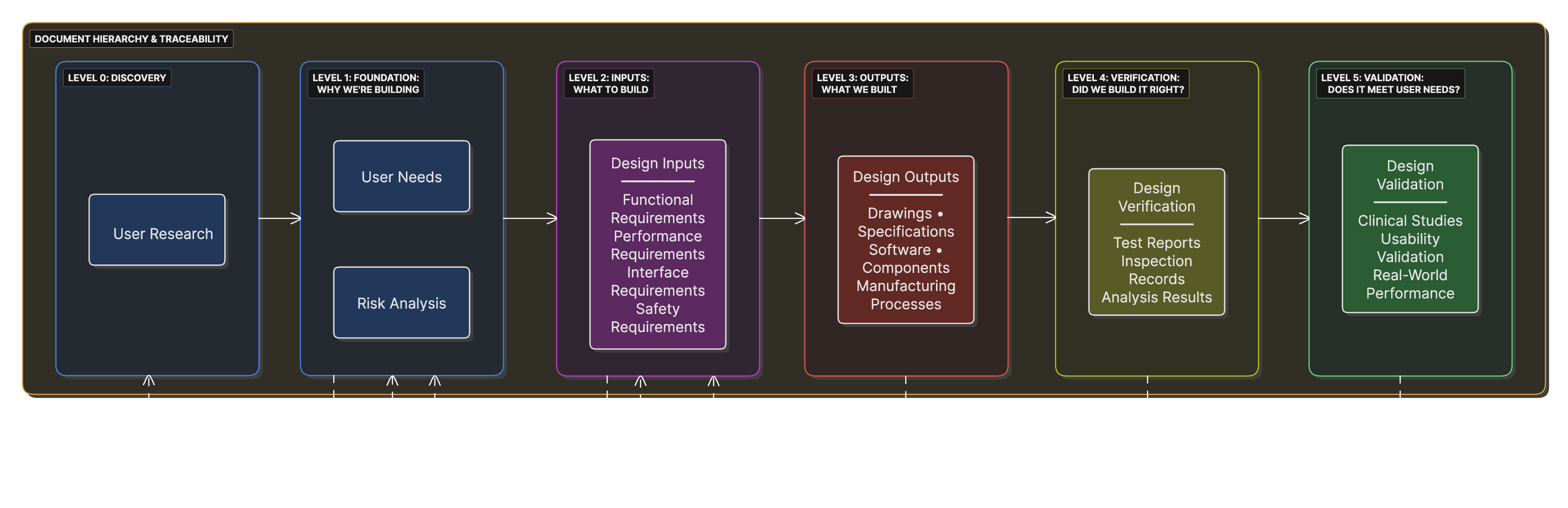
How user needs, design inputs, design outputs, and verification and validation link together, with traceability in both directions.
Developing Design Input Requirements
Design inputs are the requirements the design has to meet. Specifications come later, as design outputs. Under ISO 13485:2016 clause 7.3.3, inputs have to be complete, unambiguous, able to be verified or validated, and not in conflict with each other.
User Need to Design Input Translation
## User Need to Design Input Translation

### User Need: UN-042
"The emergency room nurse needs to obtain patient vital signs
within 60 seconds of patient arrival to enable rapid triage decisions."

### Analysis:
**What must the device do?** (Functional requirement)
- Measure blood pressure, pulse, temperature, SpO2

**How well must it perform?** (Performance requirement)
- Complete all measurements within 60 seconds
- Achieve specified accuracy for each parameter

### Resulting Design Inputs:

#### DI-042-F01: Functional Requirement
**Title:** Vital Signs Measurement Capability
**Requirement:** The device shall measure systolic blood pressure,
diastolic blood pressure, pulse rate, body temperature, and SpO2.
**Verification Method:** Demonstration of each measurement capability
**Acceptance Criteria:** All five parameters successfully measured
What Design Inputs Must Include
ISO 13485:2016 clause 7.3.3 lists what design inputs have to cover:
- Functional, performance, usability, and safety requirements for the intended use. Interface requirements (how the device connects to users and other systems) usually sit under usability and function.
- Applicable regulatory requirements and standards
- Outputs of risk management, such as risk control measures
- Information from previous similar designs, where it applies
- Any other requirements essential to the design of the product and its processes
Design Input Review and Approval
Clause 7.3.3 also requires design inputs to be reviewed for adequacy and approved. Do that before detailed design starts. It's much cheaper to fix a vague or untestable requirement now than after you've built to it.
If you're also launching in the EU
- Add the GSPR as a source of design inputs. Most teams keep a GSPR checklist that shows, for each Annex I requirement, whether it applies, how you meet it, which standard you used, and where the evidence is.
- Software has its own GSPR. Annex I section 17.2 expects development to the state of the art, covering life cycle, risk management (including information security), verification, and validation. Section 17.4 requires you to state minimum hardware, network, and IT security requirements.
- Start the clinical evaluation plan now. Annex XIV Part A requires one. The clinical benefits and performance you plan to claim become design inputs, and they decide what evidence you'll need. For implantable and Class III devices, expect to need a clinical investigation (Article 61(4) to (6) set out the narrow exceptions).
Phase 4: Early Formative Evaluation and Risk Control Planning
Put early design concepts in front of users and plan how you'll control the risks you found. Expect to go around this loop a few times before you commit to expensive detailed design.
Formative Evaluation Planning
Formative evaluations, described in FDA's human factors guidance section 6.4.3, are studies you run during development to find problems and improve the design. They can be informal, and FDA doesn't set a sample size for them. Summative (validation) testing is different, as the table shows.
Formative vs Summative Evaluation
Side-by-side comparison, based on FDA's human factors guidance (sections 6.4.3 and 8) and IEC 62366-1.
| Category | Formative: Improve the Design | Summative: Validate the Design |
|---|---|---|
| WHEN | During developmentMultiple rounds |
End of developmentOne or more studies on the final design |
| PURPOSE | Find problems Inform design decisions |
Show intended users can use the device safely and effectively |
| PARTICIPANTS | Size set by need5–10 per round is common practice. Employees can take part. |
At least 15 per distinct user groupRepresentative users only |
| PROTOTYPE | Any fidelity Mockups → working models |
Final design, including user interface, labeling, and training |
| METHOD | Think-aloud Discussion encouraged Assistance allowed |
Realistic use No facilitator help or think-aloud Only the labeling and help users would have in real use |
| OUTCOME | List of improvements Design changes expected |
Qualitative root-cause analysis of use errors, close calls, and difficulties Summarized in the HFE/UE report |
Formative Evaluation Plan Template
## Formative Evaluation Plan

### Study Identifier: FE-001
**Study Title:** [Descriptive title]
**Study Type:** [Cognitive walkthrough/Simulated use]
(Expert review is an analytical method. Record it as a
separate analysis, not as a formative study.)

### Objectives
Primary Objective:
[What specific aspect of design is being evaluated]

### Design Elements Under Evaluation
- Element 1: [Specific interface component or feature]
  - Questions to answer: _______
  - Success criteria: _______

### Method
**Target N:** _______
**User Groups:**
- Group 1: n=___, Characteristics: _______

**Task Scenarios:**
1. Scenario 1: [Normal use case]
2. Scenario 2: [Challenging case]

### Internal Targets (set by the team, not by FDA)
- >80% task completion without assistance
- No use errors on critical tasks
- Positive user feedback on the main design elements
Risk Control Planning
Take the hazards from your Phase 2 PHA and plan risk control measures for any risk that isn't already acceptable. ISO 14971:2019 clause 7.1 sets the order of priority: inherently safe design and manufacture first, then protective measures in the device or its manufacture, then information for safety and, where appropriate, training.
Critical Task Identification Process
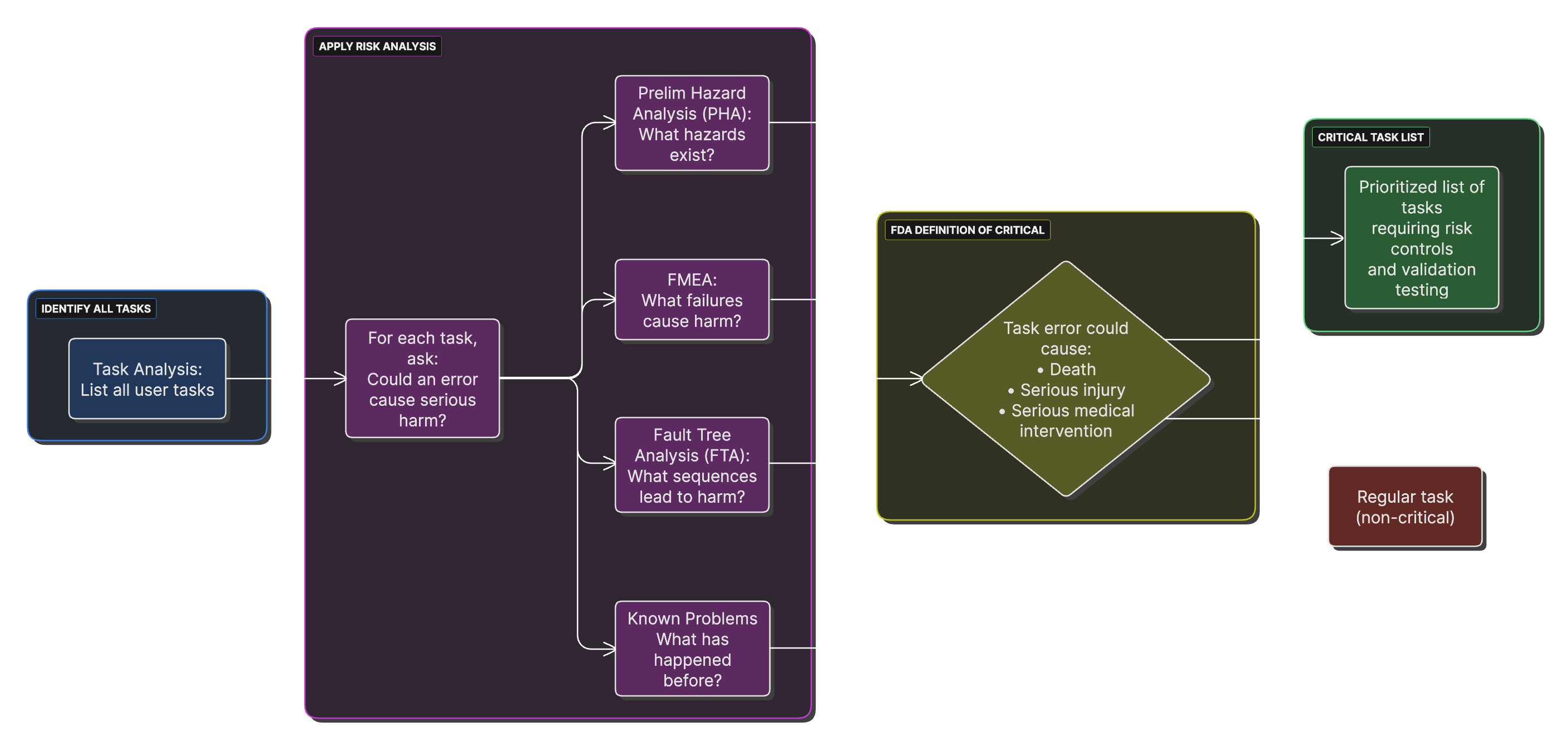
Task analysis, FMEA, and fault tree analysis converge into a prioritized list of critical tasks.
Using Formative Results
Feed what you learn back into the design, the user needs, and the risk analysis. Record each change and the finding that triggered it.
If you're also launching in the EU
The MDR sets no participant count for summative testing. A notified body judges your usability evidence against IEC 62366-1 and Annex I section 5. You can usually design one summative study that satisfies both markets: meet FDA's recommended minimum of 15 participants per distinct user group, and include EU users or use environments where they differ.
If you plan a clinical investigation in the EU, the MDR's clinical investigation rules apply (Article 62 onward and Annex XV). Build that time into the plan.
Phase 5: Integration and Documentation
The last early-stage step is housekeeping. Do it properly, because the traceability and file structure you set up here carry through the rest of development.
Building the Requirements Traceability Matrix
The requirements traceability matrix (RTM) links each user need to its design inputs, design outputs, verification, validation, and risk controls.
RTM Template
## Requirements Traceability Matrix

### Forward Traceability (Needs → Validation)

| User Need | Design Input | Design Output | Verification | Validation | Risk Control |
|-----------|--------------|---------------|--------------|------------|--------------|
| UN-001: Rapid results | DI-015-P01: Results <60sec | SW-SPEC-023: Algorithm | VER-015: Timing study | VAL-002: Clinical study | RCM-008: Timeout alert |
| UN-002: Readable display | DI-022-I03: Contrast >3:1 | DWG-045: Display spec | VER-022: Testing | VAL-002: Clinical study | RCM-012: Brightness |

### Coverage Analysis

#### User Needs Coverage:
- Total User Needs: 45
- Addressed by Design Inputs: 45
- Coverage: 100%

#### Risk Control Coverage:
- Risks judged not acceptable at risk evaluation: 23
- Of those, with risk controls in place and verified: 23
- Coverage: 100%
(Risks judged acceptable at risk evaluation, ISO 14971:2019
clause 6, need no control. They are treated as residual
risks.)
Human Factors Records
Two different documents get confused here. The usability engineering file (IEC 62366-1 clause 4.2) holds the full record of your usability work. The HFE/UE report is what FDA reviews. It's a summary of that work, described in Appendix A of FDA's human factors guidance. Start the file now. You'll write the report much later, after summative testing.
Setting Up the Design and Development File
Set up your design and development file early (ISO 13485:2016 clause 7.3.10; the old QSR called it the DHF). It holds or points to the records that show your design work met the requirements, plus the records of design changes. Keep it current as you go. Rebuilding it at the end is painful.
If you're also launching in the EU
- Lay out the technical documentation per MDR Annexes II and III. Most of the design and development file maps into Annex II, so set up the structure once and point both ways.
- Add a GSPR column to the traceability matrix. It makes the Annex I checklist much easier to maintain.
- Annex III requires a post-market surveillance (PMS) plan in the technical documentation, and Article 83 makes the PMS system part of your quality system. Draft it now, while you still remember why each risk control exists.
- Plan for UDI (Article 27) and registration in EUDAMED (Article 29) before launch.
Templates and Examples
Tip: Paste each template into your documentation system and fill it in. Keep IDs stable so traceability doesn't break.
Template A: Intended Use vs. Indications for Use
# Intended Use vs. Indications for Use

**Device working name:**
**Regulatory pathway (anticipated):** 510(k) / De Novo / PMA / TBD

## Intended Use (single sentence)
[Describe the general purpose/function of the device without specific patient population or settings.]

## Indications for Use (Form FDA 3881 style)
[Condition/problem], for [intended patient population], used by [intended user] in [use environment(s)], to [purpose].
Main limitations/contraindications (if any): [list].
Template B: User Profile Documentation
## User Profile: [User Type Name]

### Role Definition
**Primary Responsibilities:**
- Responsibility 1: _____________
- Responsibility 2: _____________

**Frequency of Device Use:**
- [ ] Multiple times daily
- [ ] Daily
- [ ] Weekly
- [ ] Occasionally

### Demographics
**Age Range:** _____________
**Gender Distribution:** _____________

### Physical Characteristics
**Vision:**
- Typical acuity range: _____________
- Common conditions: _____________

**Dexterity/Strength:**
- Fine motor skills: _____________
- Grip strength range: _____________

### Cognitive Characteristics
**Education Level:**
- Minimum: _____________
- Typical: _____________

**Technical Literacy:**
- Experience with similar devices: _____________
Template C: Preliminary Hazard Analysis Worksheet
## Preliminary Hazard Analysis Worksheet

### Analysis Information
**Product:** [Device name and version]
**Analysis Date:** _______
**Analysts:** [List team members]

### Hazard Analysis Table
(Hazard = potential source of harm. Hazardous situation =
exposure to the hazard. Harm = the injury that results.
ISO 14971:2019 clauses 3.4, 3.5, and 3.3.)

| ID | Hazard | Sequence of events | Hazardous Situation | Harm | Severity | Probability | Risk Level |
|----|--------|--------------------|---------------------|------|----------|-------------|------------|
| PH-001 | Electric energy (mains voltage) | Insulation fails; enclosure becomes live | User touches live enclosure | Burns, cardiac arrest | Catastrophic | Remote | HIGH |
| PH-002 | Mechanical energy (sharp edge) | Burr left on housing during manufacture | User handles housing with a sharp edge | Laceration | Minor | Occasional | LOW |

### Severity Levels (adapted from the example in ISO/TR 24971:2020 Table 4.
Define your own scale in your risk management plan.)
**Catastrophic (5):** Death
**Critical (4):** Permanent impairment or irreversible injury
**Serious (3):** Injury that needs medical or surgical treatment
**Minor (2):** Temporary injury, no medical or surgical treatment needed
**Negligible (1):** Inconvenience or brief discomfort
Template D: Design Input Requirement
## Design Input Requirement

### Requirement ID: DI-XXX-YZZ

### Basic Information
**Title:** [Concise descriptive title]
**Category:** [Functional/Performance/Usability/Safety/Regulatory/Risk control]
**Priority:** [Critical/High/Medium/Low]
**Status:** [Draft/Under Review/Approved]

### Requirement Statement
The [device/system/component] shall [single specific requirement
stated in clear, verifiable terms].

**Quantitative Specification** (if applicable):
- Parameter: [What is being measured]
- Value: [Specific number with tolerance]
- Units: [Measurement units]
- Conditions: [Test conditions, environment]

### Rationale
**Source:** [UN-XXX user need or PH-XXX risk reference]
**Justification:** [Why this specific requirement level]

### Verification
**Method:** Test/Inspection/Analysis/Demonstration
**Protocol Reference:** VER-XXX
**Acceptance Criteria:** [Specific pass/fail criteria]
Template E: User Interview Guide
## Semi-Structured User Interview Guide

### Introduction Script
"Thank you for participating. We're developing a new medical device
and want to understand your needs and current practices. There are
no right or wrong answers. This will take about 45 minutes."

### Section 1: Background (10 minutes)
1. Can you describe your current role and responsibilities?
2. What types of [relevant procedures] do you perform?
3. What is your experience with [current devices/methods]?

### Section 2: Current Workflow (15 minutes)
4. Walk me through a typical [procedure] from start to finish.
5. What works well in your current process?
6. What challenges or frustrations do you experience?

### Section 3: Specific Scenarios (10 minutes)
7. How do you handle [challenging scenario 1]?
8. Tell me about a time when [error/problem occurred].

### Section 4: Ideal Solution (10 minutes)
9. If you could design the perfect [device], what would it do?
10. What should definitely be avoided in a new design?
If you're also launching in the EU
Three small changes cover it. Give Template A a third box for the intended purpose (Article 2(12)) and check it against your labeling and marketing claims. In Template C, add a column recording whether each risk was reduced as far as possible, and why you stopped where you did. Template D gets a field that links each requirement to the GSPR it supports.
Common Pitfalls and What Works
Common Pitfalls in Early Development
Pitfall 1: Starting Design Before Understanding Users
The Problem
A lot of startups go straight to engineering based on guesses about what users need. The result works on the bench and fails in the clinic.
Warning Signs
- Nobody has watched a real user do the task
- Requirements copied from competitors' products
- Engineers making clinical calls
- "We know what users need"
What to Do Instead
Our rule of thumb is to spend at least 20% of early development time on user research. FDA doesn't set a number, but its human factors guidance recommends user and use-environment analysis early in the design process (sections 5 and 6).
Pitfall 2: Confusing User Needs with Design Solutions
Wrong Approach
"User needs a touchscreen interface." That's a solution.
Right Approach
"User needs to operate the device while wearing gloves." That's a need.
What to Do Instead
Keep asking "why" when you write a need down. You usually reach the real need after three to five rounds.
Pitfall 3: Too Narrow a Risk Analysis
The Problem
Teams look only at what happens when parts fail, and miss use errors and the environment.
Signs of an Incomplete Analysis
- Only component failures considered
- User interaction risks ignored
- Environmental hazards missed
- Maintenance and service overlooked
A Fuller Approach
- Device failures and use errors
- Intended use and reasonably foreseeable misuse (ISO 14971:2019 clause 5.2)
- Direct harm and indirect consequences
- Risks to patients, users, and bystanders
Pitfall 4: Writing Requirements You Can't Verify
Examples of Poor Requirements
- "The device shall be user-friendly" (How do you measure this?)
- "The display shall be easily readable" (Under what conditions?)
- "The device shall operate reliably" (What's the metric?)
Examples of Good Requirements
- "The device shall have all controls accessible within a 40cm reach envelope"
- "The display shall have contrast ratio ≥3:1 at 500 lux ambient lighting"
- "The device shall operate for 10,000 cycles with <2% failure rate"
Pitfall 5: Losing Traceability
The Problem
Requirements change, the links back to the original needs get lost, and you can no longer show that the device meets them.
How to Prevent It
- Set up a numbering system on day one
- Write down the rationale for every requirement
- Record each change and the reason for it
- Audit traceability regularly
- Keep one source of truth for requirements
What Works for Startups
Front-Load User Research
A Starting Budget Split (our rule of thumb)
- Phases 0–1: 30% of resources on user research
- Phases 2–3: 20% on requirements
- Phase 4 onward: 50% on design and build
Adjust it to your device. A software-only product and an implant will look very different.
Iterate Early and Often
Iteration Pace
- Paper prototypes: daily
- Mockups: weekly
- Working prototypes: every two weeks
- Production design: monthly reviews
The "10x" Rule of Thumb
Engineers often say a change costs about ten times more at each later phase. It's a rough planning heuristic, not measured data, but the direction holds:
- Concept phase: $100
- Design phase: $1,000
- Verification phase: $10,000
- Post-market: $100,000
Record Decisions as Well as Outcomes
Design Decision Record Template
## Design Decision Record

**Decision ID:** DD-017
**Date:** 2024-03-20
**Decision:** Use rechargeable lithium-ion battery

**Alternatives Considered:**
1. Disposable alkaline batteries
2. Rechargeable NiMH battery
3. Rechargeable lithium-ion battery
4. AC power only

**Decision Rationale:**
Selected Option 3 (Li-ion) because:
- 8-hour runtime meets UN-032 (full shift operation)
- Rechargeable reduces operating cost 90%
- Energy density enables portable form factor
- Safety risks manageable with protection circuits

**Risk Controls:**
- Battery management system
- IEC 62133 compliant cells
- Thermal protection

**Approvers:**
Technical Lead: [Name]
Quality: [Name]
Regulatory: [Name]
Build Quality Into the Design
Design Principles
- Prevent errors instead of only detecting them
- Physical constraints that stop wrong connections
- Software interlocks against dangerous settings
- Clear affordances that guide correct use
- Fail safe
- Safe state on power loss
- Conservative default settings
- Automatic safety checks on startup
- Design with margin
- Components rated for about 2x the expected stress
- Algorithms stable across ±20% parameter variation
- Interfaces usable at the extremes of your users' vision and dexterity
Talk to FDA Early
Ways to Engage FDA
- 513(g) request if you need FDA's written view on classification
- Q-Submission program. This includes Pre-Submissions (feedback on pathway, testing plans, and human factors protocols) and Breakthrough Device designation requests. See FDA's Q-Submission guidance (May 2025).
A Typical Regulatory Timeline
- Phase 0: Classification research
- Phase 1: Pathway decision
- Phase 2: Identify applicable standards
- Phase 3: Prepare a Pre-Submission
- Phase 4: Pre-Submission meeting
- Phase 5: Submission planning
Measuring Early Development
These are internal targets we've found useful. None of them come from FDA or a standard.
Success Metrics Checklist
## Success Metrics for Early Development (internal targets)

### User Research
- Users observed: Target ≥10 per user group
- Use environments studied: ≥3 diverse settings
- User needs identified: 40-60 typical range
- Needs confirmed by more than one user: >80%

### Risk Management
- Hazards identified in PHA: 20-40 typical
- Risk controls per hazard: Average 2-3
- Every risk is acceptable per your risk management plan,
  or has a documented benefit-risk analysis
  (ISO 14971:2019 clauses 7.4 and 8)

### Design Inputs
- Requirements per user need: 1-3 typical
- Verifiable requirements: 100%
- Requirements stability: <10% change after approval
- Orphan requirements: 0%

### Formative Evaluation
- Rounds completed before summative testing: ≥3
- Use errors per round: decreasing
- Task success rate: >80% by the last round
- User satisfaction: improving
If you're also launching in the EU
Treating the EU file as a copy of the US file. A cleared 510(k) doesn't carry over. The EU class can differ, clinical evaluation is required for every device, and equivalence to another device is harder to claim under the MDR than substantial equivalence is in the US. Check classification (Annex VIII), the GSPR, and clinical evaluation needs (Annex XIV) early, before the US file is locked.
Starting the notified body search late. Not every notified body covers every device type, and the good ones book up. Shortlist bodies that cover your device code during Phase 0 or 1.
Appendices
Appendix A: Regulatory Resources
Regulation
- 21 CFR Part 820, Quality Management System Regulation (effective February 2, 2026)
- 820.7 incorporates ISO 13485:2016 by reference, and 820.10 requires a quality system that complies with it
- 820.10(c) sets which devices need design and development (ISO 13485 clause 7.3)
FDA Guidance Documents
- Applying Human Factors and Usability Engineering to Medical Devices (February 2016)
- The core guidance for user research and formative evaluation
- Sections 5 and 6 matter most in the early stages
- General/Specific Intended Use (November 1998)
- Explains when a more specific indication becomes a new intended use in a 510(k)
- Includes nine worked examples. It refers to the separate 510(k) flowchart (K86-3) and doesn't contain one itself.
- Requests for Feedback and Meetings for Medical Device Submissions: The Q-Submission Program (May 2025)
- How to ask FDA for early feedback through a Pre-Submission
- Cybersecurity in Medical Devices: Quality Management System Considerations and Content of Premarket Submissions (February 3, 2026)
- Read it early if your device has software and connects to anything
- Design Control Guidance for Medical Device Manufacturers (March 1997)
- Written for the old 21 CFR 820.30, before the QMSR
- Useful background on planning (section B) and design input (section C). For current requirements, use ISO 13485:2016 clause 7.3.
Recognized Standards
- ISO 14971:2019, Risk management
- FDA Recognition #5-125
- Clauses 4 and 5 matter most in early development
- IEC 62366-1:2015+AMD1:2020, Usability engineering
- FDA Recognition #5-129
- Clause 4 (principles) and clause 5.1 (use specification)
- ISO 13485:2016, Quality management systems
- Clause 7.3 covers design and development
- Required under the QMSR since February 2, 2026
- ANSI/AAMI HE75:2025, Human factors engineering: Design of medical devices
Appendix B: Glossary of Terms
## Glossary of Terms

**Critical Task:** A user task which, if performed incorrectly or not performed at all, would or could cause serious harm to the patient or user, where harm is defined to include compromised medical care. (FDA human factors guidance, section 3.2)

**Design and Development (formerly "Design Controls"):** The controlled process for designing a device, required by 21 CFR 820.10(c) through ISO 13485:2016 clause 7.3. The old QSR called this design controls (21 CFR 820.30, now removed).

**Design and Development File (formerly "Design History File," DHF):** The file kept for each device type or family that contains or references the records showing design and development requirements were met, plus records of design changes. (ISO 13485:2016 clause 7.3.10)

**Design Input:** The requirements the design must meet, based on the intended use: functional, performance, usability, and safety requirements, applicable regulatory requirements and standards, and outputs of risk management. (ISO 13485:2016 clause 7.3.3)

**Design Output:** The results of design work, such as specifications, drawings, and software. Outputs must meet the input requirements, give the information needed for purchasing, production, and service, contain or reference acceptance criteria, and identify characteristics essential for safe and proper use. (ISO 13485:2016 clause 7.3.4)

**Formative Evaluation:** A user interface evaluation done during development to find design strengths, weaknesses, and unexpected use errors. (IEC 62366-1 clause 3.7)

**Harm:** Injury or damage to people's health, or damage to property or the environment. (ISO 14971:2019 clause 3.3)

**Hazard:** Potential source of harm. (ISO 14971:2019 clause 3.4)

**Hazardous Situation:** Circumstance in which people, property, or the environment are exposed to one or more hazards. (ISO 14971:2019 clause 3.5)

**Indications for Use:** The disease or condition the device will diagnose, treat, prevent, cure, or mitigate, and the patient population it's intended for. (21 CFR 814.20(b)(3)(i); entered on Form FDA 3881)

**Intended Use:** In FDA premarket practice, the general purpose or function of the device. In regulation, the objective intent of the persons legally responsible for the labeling. (21 CFR 801.4)

**Preliminary Hazard Analysis (PHA):** An early analysis that identifies hazards, hazardous situations, and possible harms before detailed design, when little design detail exists. (ISO/TR 24971:2020 Annex B.2)

**Reasonably Foreseeable Misuse:** Use the manufacturer didn't intend, but that can result from readily predictable human behavior. (ISO 14971:2019 clause 3.15)

**Risk:** Combination of the probability of occurrence of harm and the severity of that harm. (ISO 14971:2019 clause 3.18)

**Risk Control:** The process of deciding on and putting in place measures that reduce risks to, or keep them within, specified levels. (ISO 14971:2019 clause 3.21)

**Use Environment:** The actual conditions and setting in which users interact with the device. (IEC 62366-1 clause 3.20)

**Use Error:** A user action, or lack of action, that leads to a different result than the manufacturer intended or the user expected. (IEC 62366-1 clause 3.21. FDA's human factors guidance, section 3.9, uses a narrower definition tied to harm.)

**Use Specification:** A summary of the important characteristics of the context of use. Typical elements: intended medical indication, patient population, part of the body or tissue type, user profile, use environment, and operating principle. (IEC 62366-1 clauses 3.23 and 5.1)

**User Need:** A high-level statement of what users need to accomplish, independent of any design solution.

**Validation:** Confirming with objective evidence that the requirements for a specific intended use or application have been met. (ISO 9000:2015 clause 3.8.13, which the QMSR applies)

**Verification:** Confirming with objective evidence that specified requirements have been met. (ISO 9000:2015 clause 3.8.12, which the QMSR applies)
Appendix C: Document Control Basics
Version Control System
## Document Version Control

### Version Numbering
X.Y.Z format where:
- X = Major version (significant changes)
- Y = Minor version (moderate changes)
- Z = Editorial version (typos, formatting)

### Version History Table
| Version | Date | Author | Changes | Approver |
|---------|------|--------|---------|----------|
| 0.1 | [Date] | [Name] | Initial draft | N/A |
| 0.2 | [Date] | [Name] | Added sections 3-4 | N/A |
| 1.0 | [Date] | [Name] | First approved version | [Name] |

### Document Status Definitions
- **Draft:** Under development, not for use
- **For Review:** Complete, awaiting approval
- **Approved:** Released for use
- **Obsolete:** Superseded, retained for history
Appendix D: Early Development Checklist
## Early Development Phase Checklist

### Phase 0 Complete
- [ ] Market need checked with real users (our target: 10 or more)
- [ ] Technical feasibility demonstrated
- [ ] Competitive analysis completed
- [ ] Go/No-go decision documented
- [ ] Development team identified
- [ ] Funding secured

### Phase 1 Complete
- [ ] Intended use statement drafted
- [ ] Indications for use defined
- [ ] User profiles documented
- [ ] Use environments characterized
- [ ] Use specification per IEC 62366-1 clause 5.1

### Phase 2 Complete
- [ ] User needs documented and prioritized
- [ ] Preliminary hazard analysis completed
- [ ] Known problems research done
- [ ] Initial risk controls identified

### Phase 3 Complete
- [ ] Design and development plan approved
- [ ] Design inputs documented, reviewed, and approved
- [ ] Requirements traceable to needs
- [ ] Verification methods identified
- [ ] Change control in place

### Phase 4 Complete
- [ ] Formative evaluations conducted (our target: 3 or more rounds)
- [ ] Critical tasks identified and explored in formative testing
- [ ] Risk controls defined
- [ ] Design iterations documented

### Phase 5 Complete
- [ ] Traceability matrix established
- [ ] Usability engineering file organized
- [ ] Design and development file structure created
- [ ] Document control system working
- [ ] Ready for detailed design
Conclusion
Change the templates to fit your device, your users, and your pathway. Keep the records and the traceability going as you move into detailed design, verification, and validation. Rebuilding them later costs far more than keeping them current.
If you're also launching in the EU
- Regulation (EU) 2017/745 on medical devices (MDR). Annex I (GSPR), Annexes II and III (technical documentation), Annex VIII (classification), Annex XIV (clinical evaluation and PMCF).
- MDCG 2019-11 Rev.1 (June 2025): qualification and classification of software under the MDR and the IVDR
- MDCG 2019-16 Rev.1 (July 2020): cybersecurity for medical devices
- EN ISO 13485:2016+A11:2021 and EN ISO 14971:2019+A11:2021: the European editions. Both are harmonised under the MDR, so they give a presumption of conformity, and their Annex Z tables map each clause to the MDR.
Terms: Intended purpose (MDR Article 2(12)) is the EU counterpart to intended use and indications for use. A notified body is an organization designated to assess conformity under the MDR. The GSPR are the General Safety and Performance Requirements in MDR Annex I. The PRRC is the person responsible for regulatory compliance (Article 15).
This guide reflects FDA regulations, guidance, and recognized standards as of October 2026. Requirements change, so check the current versions and talk to a regulatory professional about your specific device.
Document Version: 2.0
Last Updated: October 2026 (updated for the QMSR and current standard editions)